

Construction Equipment Rental Software for Heavy Equipment Fleets
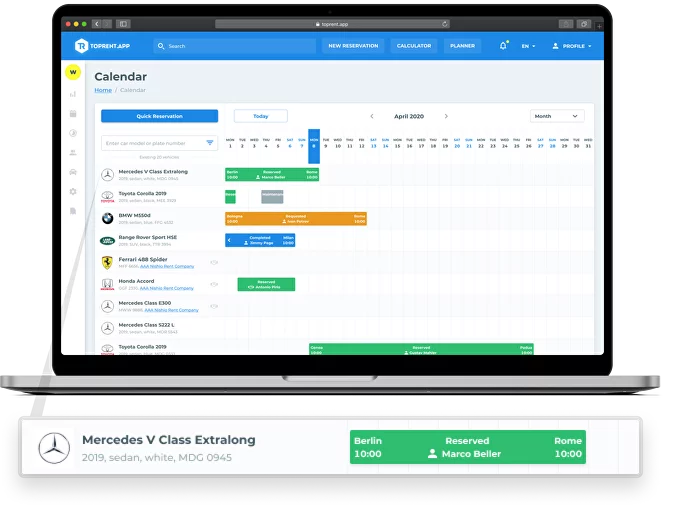
TopRentApp is cloud-based heavy equipment rental software for companies renting excavators, loaders, lifts, cranes, compactors, tools, and attachments. Manage real-time availability, reservations, unit assignments, jobsite delivery and pickup, rates, contracts, inspections, maintenance, invoices, payments, and customer records in one connected equipment rental software platform.

Rental Operations Built Around Equipment and Jobsites
Construction equipment rentals involve more than placing a machine on a calendar. The correct unit, attachments, rate structure, jobsite contact, delivery window, inspection record, and final charges all need to remain aligned as the rental changes.
TopRentApp gives office, yard, dispatch, and field teams one connected view from the initial request through equipment return and billing. This reduces the need to reconcile separate spreadsheets, paper documents, messages, and calendars.
One Rental Record from Request to Final Invoice
Heavy equipment rental software is a shared operational system for managing machines, customers, pricing, contracts, jobsites, logistics, inspections, maintenance, and billing. TopRentApp keeps those details connected instead of dividing the rental workflow between spreadsheets, paper files, and separate calendars.
Plan the Rental
Build an organized rental record before committing a machine or promising a delivery date.
- Capture the customer, rental period, equipment category, jobsite, delivery needs, and requested attachments.
- Check unit availability, existing reservations, maintenance blocks, and turnaround time before assignment.
Price and Confirm
Keep commercial terms transparent and connected to the equipment and customer.
- Apply hourly, daily, weekly, or monthly rates together with attachments, transport fees, deposits, discounts, and additional charges.
- Keep the quote, approved terms, agreement, customer documents, deposit, and payment status attached to the reservation.
Dispatch and Manage
Move the correct machine and attachments from the yard to the jobsite with fewer handoff gaps.
- Coordinate delivery and pickup windows, site contacts, access notes, driver instructions, and equipment handover.
- Record the checkout inspection, operating status, customer communication, extensions, and expected return during the active rental.
Return and Close
Complete the rental without losing condition records, service requirements, or billable charges.
- Record return condition, damage, fuel or hour-meter details, missing items, late fees, and maintenance needs.
- Calculate final charges and invoices, then update the machine as available, awaiting inspection, or in service.
Keep the Most Operationally Sensitive Stage Under Control
The highest-friction stage often begins after a unit is reserved. Delivery timing, site access, attachments, equipment condition, and pickup planning must remain visible to everyone involved. A shared dispatch workflow helps office, yard, transport, and field teams work from the same information.
Delivery and Pickup Planning
- Realistic windows: plan arrival ranges, pickup timing, and turnaround buffers between rentals.
- Complete jobsite details: store the address, site contact, access requirements, and working hours.
- Clear driver instructions: keep gate requirements, drop zones, and special handling notes visible.
- Connected confirmations: retain delivery and pickup information with the corresponding rental record.
Unit Status and Assignment
- Operational status: distinguish scheduled, in transit, on site, return scheduled, awaiting inspection, and in service.
- Correct machine and attachments: connect each reservation to the specific unit and required accessories.
- Safer rescheduling: adjust dates or transport windows without losing the surrounding availability context.
- Fewer handoff errors: give office, yard, dispatch, and field teams one shared schedule.
Operational result: when jobsite logistics live beside reservations, fleet availability, inspections, and billing, your team spends less time clarifying handoffs and more time preparing, delivering, and turning equipment around.
Platform benefits
Your business will benefit from our construction equipment rental software, which was made to be very flexible, customizable, and strong.
01
Cloud Capability
With our cloud-based system, you can access and manage your fleet anytime, anywhere, and round the clock.
02
Pricing Flexibility
You can change your rental prices based on different time frames on our platform, such as hourly, daily, or monthly.
03
Damage Assessment
Swiftly and meticulously track all damage to your equipment. This feature saves you both time and money by ensuring timely repairs and maintenance.
04
Reservation Integration
Integrate our platform directly with your website for a real-time view of all reservations. Better customer service and more efficient schedules are made possible by this feature.
Tailored for Your Success
There is more to our platform than meets the eye. Your company’s special needs can be accommodated. Boost efficiency and realize your goals by selecting from over 30 add-ons.
No matter what challenges you encounter, our platform—which was created in collaboration with global leaders in the heavy equipment rental and construction industries—ensures that you will always remain one step ahead of the competition.
We work hard to develop a one-of-a-kind solution since the success of your business is our top concern. As we sincerely work together, we pledge to provide prompt, efficient solutions that are customized to meet your demands.
How Construction Equipment Rental Software Connects the Entire Rental Cycle
TopRentApp keeps the machine, attachments, customer, jobsite, reservation, commercial terms, condition records, service status, and billing connected to one rental record. Your team can make availability, dispatch, maintenance, and invoicing decisions from the same current information.
Equipment Reservations & Availability
Check real-time availability before assigning an excavator, loader, lift, crane, tool, or other unit. Reservations stay aligned with active rentals, maintenance blocks, inspections, and turnaround time.
Dispatch & Jobsite Coordination
Keep delivery and pickup windows, jobsite contacts, access instructions, unit assignments, attachments, and transport details connected to the corresponding rental.
Rates, Quotes & Rental Charges
Apply hourly, daily, weekly, or monthly rates together with attachments, transport, deposits, discounts, overtime, extensions, fuel, damage, and other rental-specific charges.
Inspections, Damage & Maintenance
Record checkout and return condition, damage notes, service needs, inspections, downtime, and maintenance status before the equipment becomes available for another rental.
Customers, Contracts & Rental History
Keep customer details, jobsites, previous rentals, notes, agreements, deposits, invoices, payment status, and approvals available from the same equipment rental record.
Utilization & Fleet Reporting
Review booking activity, utilization, downtime, rental history, service records, and revenue patterns to support better equipment, maintenance, pricing, and fleet planning decisions.
Heavy Equipment Rental Software Should Show More Than an Empty Calendar
A machine may have no reservation and still be unavailable because it is in transit, awaiting inspection, missing an attachment, or scheduled for maintenance. TopRentApp keeps operational status visible alongside the rental schedule.
Keep Pricing and Final Billing on the Same Rental
Construction rentals often change after the original quote. Keeping rates, approved extras, extensions, transport, and return charges together makes the final invoice easier to verify.
One Equipment Rental Software Workflow from Request to Invoice
Instead of rebuilding the rental history at every stage, keep the equipment, customer, jobsite, pricing, condition, service information, and financial records attached to the same operational workflow.
Free consultation
Fill in the contact details in the form, our specialist will contact Vai as soon as possible